FROST
De-Esser KM-11
Takes the sting out of sibilance and leaves the air.
AU · VST3 · macOS
What it does.
FROST finds the s, sh and t sounds and turns down only those: the whole signal, or only the band above the detection frequency. Detection is relative. It compares the sibilance band with the body of the voice, so the threshold follows the singer when they get louder or softer.
Listen solos the detector, so you hear what it hears. Range caps how much it is allowed to take, and look-ahead catches the front of the s before it reaches the speaker.
- Best on
- Vocals · Voice-over · Acoustic guitar · Cymbals
- Line
- Precision
- Category
- Dynamics
Hear it.
The same recording without and with FROST, set from SCAN and adjusted by ear. Switch while it plays; the position stays where it is.
The before-and-after examples are being recorded. They will appear here.
What's inside.
Relative detection
The sibilance band is compared with a slow envelope of the voice, so quiet lines get the same treatment as loud ones. The threshold runs from −30 to +6 dB, relative.
Two detector modes
Single Vocal listens around the s against the body of the voice. Allround listens to everything above the frequency against the full band, for mixes, cymbals and guitars.
Split or Wide
Split turns down only the band above the detection frequency, like a dynamic high shelf, so the air stays. Wide turns down the whole signal. When nothing is being reduced, the signal passes untouched.
Frequency from 2 to 16 kHz
Drag the detection band on a live input and output spectrum, or let SCAN place it.
Listen and Range
Listen solos the detector band. Range caps the reduction between 0 and 24 dB.
Lookahead, link and Mix
Lookahead up to 4 ms, with the latency reported to the host. Stereo link gives both channels the same reduction, and Mix blends the dry signal back in.
SCAN for FROST.
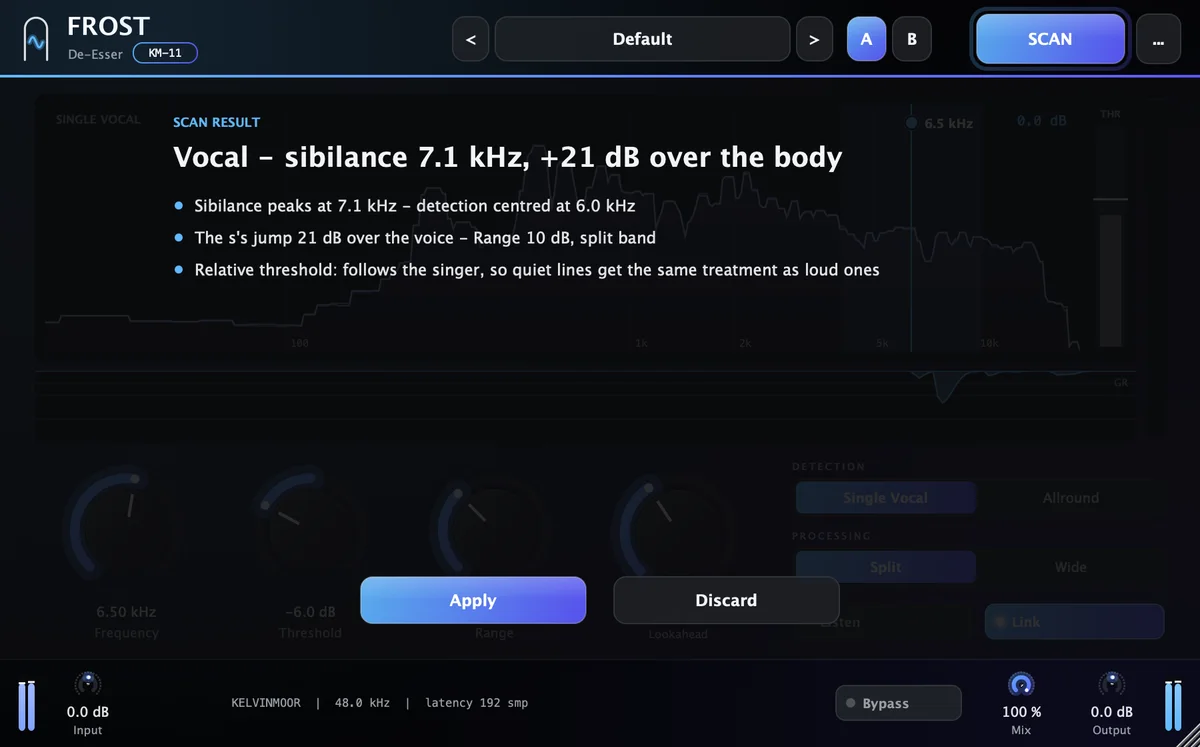
Play a vocal passage with plenty of S and T sounds for about ten seconds. SCAN measures the take and proposes settings for Mode, Frequency, Threshold, Range, Lookahead. Each move comes with the reason, in one line.
Apply it with one click, then trust your ears. It is a starting point an engineer would be happy to begin from.
Play a vocal passage with plenty of S and T sounds for about ten seconds.
- Source
- Vocal
- Sibilance peak
- 6.8 kHz
- Over the voice
- +9 dB
Recommended
- Detection centered at 5.8 kHz: the sibilance peaks at 6.8 kHz
- Range 7 dB on the split band: the s sounds jump 9 dB over the voice
- Threshold −5 dB, relative: quiet lines get the same treatment as loud ones
- Lookahead 1.5 ms
Example readout. The values depend on your material.
Specifications.
Controls
- Frequency
- 2–16 kHz
- Threshold
- −30 to +6 dB (relative)
- Range
- 0–24 dB
- Mode
- Single Vocal · Allround
- Band
- Split · Wide
- Lookahead
- 0–4 ms
- Monitoring
- Listen
- Stereo link
- On · Off
- Mix
- 0–100 %
- Latency
- Fixed, 4 ms
Formats and system
- AU
- macOS
- VST3
- macOS
- AAX
- Coming soon
- Windows
- Coming soon
- macOS
- 11 Big Sur or later
- Processor
- Apple silicon and Intel
- Sample rates
- 44.1–192 kHz
- Channels
- Mono and stereo
- Interface size
- 75–200 %
- Latency
- Reported to the host
FROST
De-Esser. One payment, yours to keep.
List price $59−51%, now $29Launch price
- Free 7-day trial before you buy
- Serial for 1 computer at a time, works offline 45 days
- Free updates for version 1
Add another plugin and both are 15% off; ten or more, 45% off. How bundles work, or all twenty in Complete for $299.